
Skip to content
RMS

Feature

Fast POS and billing software for the counter

RMS is offline POS and billing software for independent shops. Service shops start a bill from the customer's vehicle, stores start with the barcode scanner. A returning customer's oil change bill takes under 30 seconds using only the keyboard, and a 10-item barcode sale under 20 seconds. It works in your currency and needs no internet.

Last updated 18 October 2026

What problem does it solve?

When cars or customers queue at the counter, writing bills by hand or clicking through slow screens costs time and makes mistakes. Change is counted wrong, a discount is forgotten, and a customer who went to fetch something blocks the next bill.

What do you get?

  • Function keys run the counter (F2 customer, F3 item, F4 payment, F8 hold, F9 repeat last bill, Ctrl+Enter save, Ctrl+P reprint).
  • Find a customer by vehicle plate typed any way (abc1234 or ABC-1234), by name or by any part of the phone number.
  • Scan barcodes, type 3*code to add three at once, scan weighing-scale labels or tap quick-sale buttons.
  • Sell in the item's own unit (pieces, litres, kg, lb, metres, feet, packs) with quantities like 3.5 L or 1.25 kg where the unit allows.
  • Line and bill discounts with a limit for each user, service and delivery charges, VAT, GST or sales tax included or added on top, and rounding of the total.
  • Take cash with change, split a bill across card, mobile wallet, bank transfer or store credit, or put it on the customer's account with a promised date.
  • Hold a bill with F8 and bring it back from Held bills while you serve the next customer.
  • Return some or all items with a printed credit note, exchange goods, or take an old item in as a buy-back.
  • Correct a saved bill with a reason; the invoice keeps its number and the owner can see what changed.
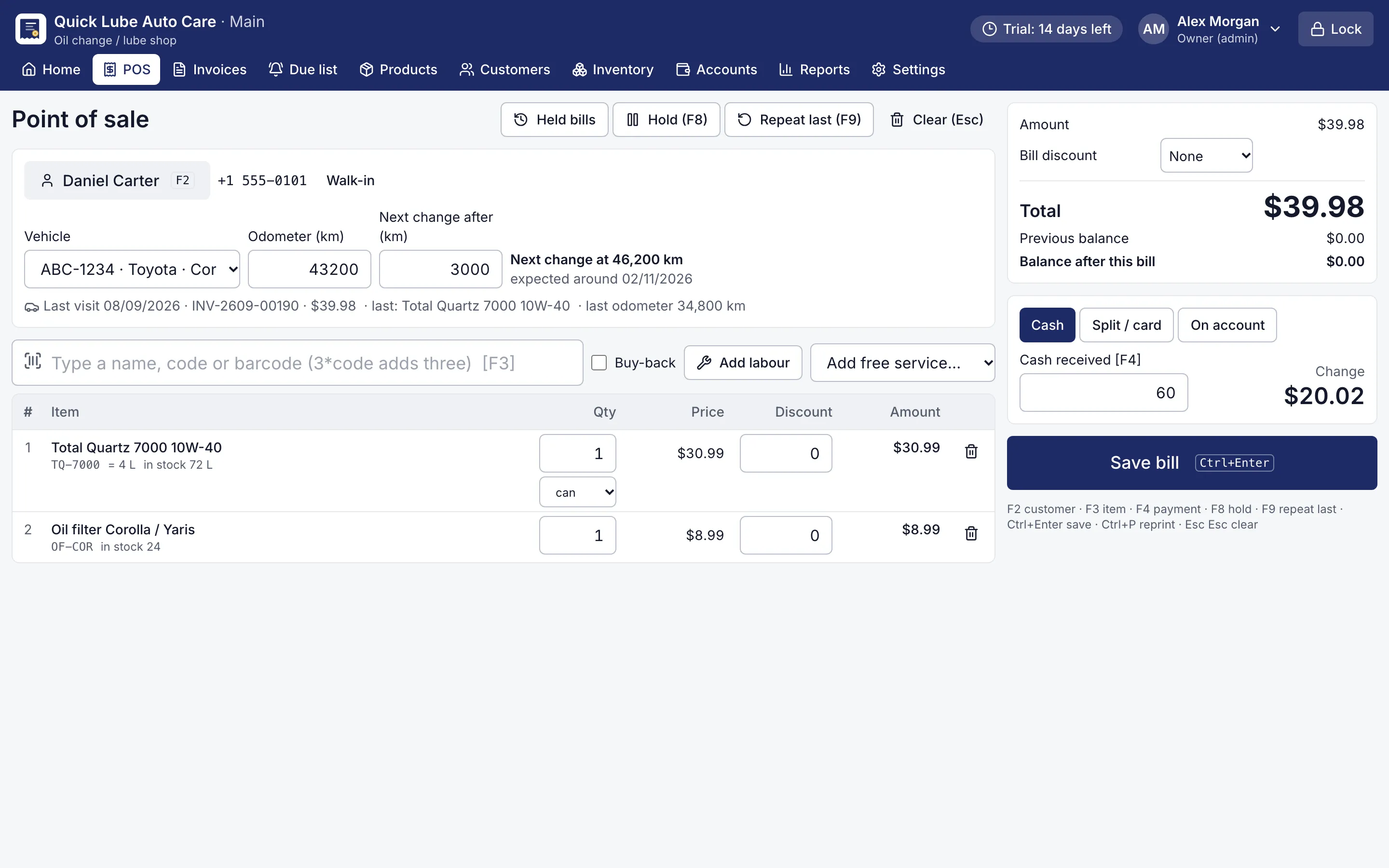
RMS point of sale with an oil change bill, the customer's car and the next change at km
Oil change bill at the counter. A returning car: plate, odometer, F9 repeats the last oil and filter, Ctrl+Enter saves.
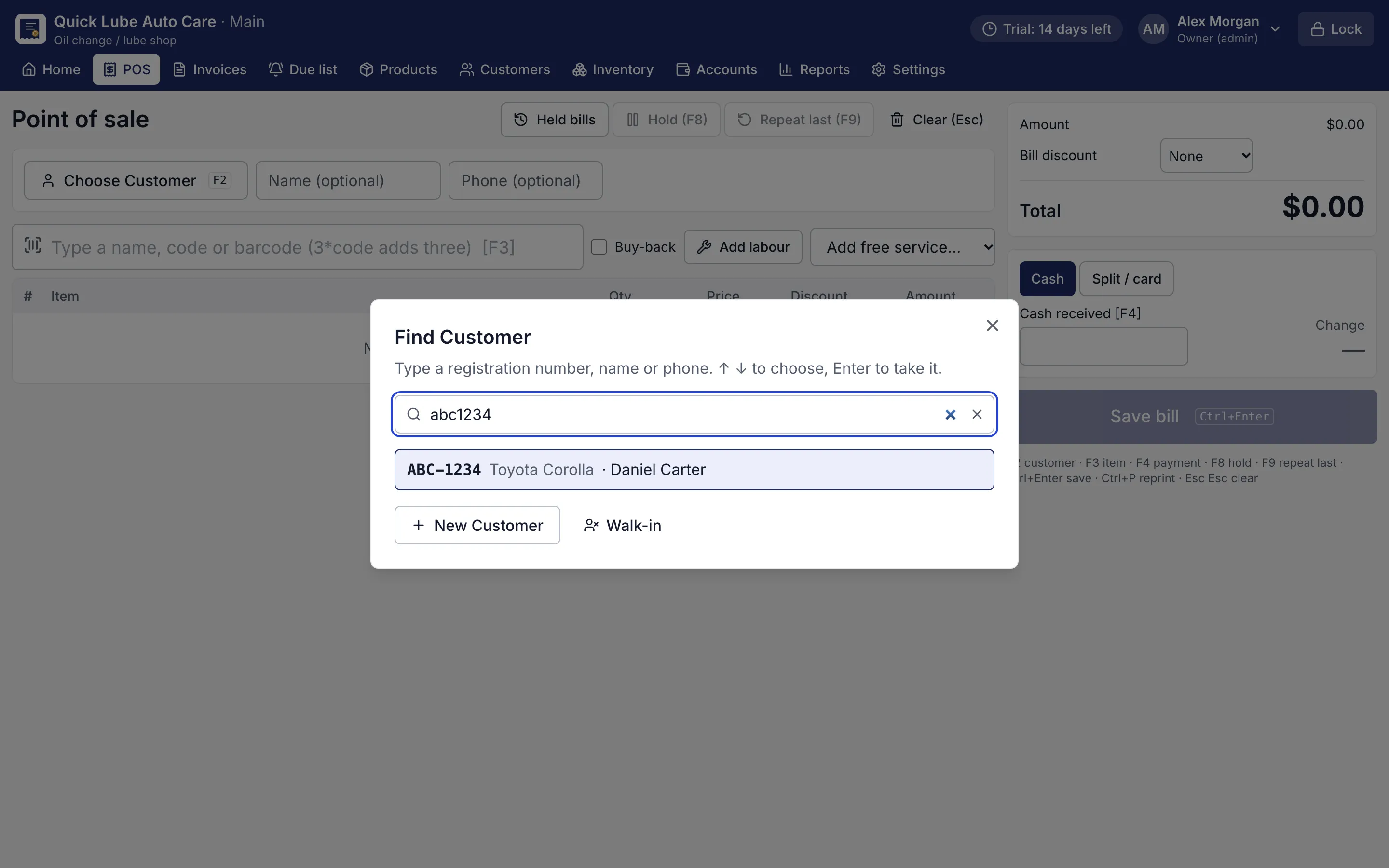
Customer finder showing a car found by its registration number typed without spaces
Find a customer by plate. Type the plate any way (abc1234, ABC-1234): the customer and car come up together.

How does the RMS counter work?

RMS is POS and billing software built around the keyboard. A cashier who learns six keys can run the whole counter without touching the mouse. Service shops (oil change, tyres, workshops, car wash, bikes) start with the customer and vehicle. Stores start with the barcode scanner.

A returning car at an oil change shop goes like this:

  1. Press F2, type the plate and press Enter. The customer and car come up together.
  2. Type today’s odometer reading.
  3. Press F9 to repeat the last oil and filter.
  4. Press F4, type the cash received and see the change.
  5. Ctrl+Enter saves. The bill shows the next change km and an expected visit date.

That takes under 30 seconds. In a grocery or department store, ten barcode scans and Ctrl+Enter finish a sale in under 20 seconds, and searching stays under 200 milliseconds even with 50,000 customers.

What can I put on one bill?

On the bill How RMS handles it
Discounts Per line or on the whole bill, as an amount or %, never above the user’s limit
Tax Your tax name (VAT, GST or sales tax) and rate, included in prices or added on top, with a separate tax invoice series for business customers
Units Loose oil by the litre, rice by the kg, cable by the metre, or a full carton at its own price
Charges Service and delivery charges
Staff Sales person, up to two service men or washers, and the bay
Old items Buy-back (for example an old battery) comes off the bill

Prices, totals and change show in your own currency, with your symbol, 0 or 2 decimals and your number grouping.

How do customers pay?

Cash with change, card, mobile wallet, bank transfer, store credit, or a mix of these in one bill. Regular customers can buy on credit: the unpaid part goes to their customer account with a promised date, and an earlier balance can be collected with the new bill. Every payment lands in the day’s cash book, so the drawer count at day close makes sense.

What happens after the bill is saved?

Stock goes down straight away. You can reprint with Ctrl+P, print a thermal receipt or an A4/A5/A6 invoice, return items with a credit note, or exchange them. A bill with a mistake can be corrected with a reason, and a deleted bill stays visible to the owner.

Everything runs on the shop’s own computer, with no internet and no monthly login. Download the free 14-day trial, no card needed, and bill your first customer in a few minutes.

Which shops use it?

Questions shop owners ask

How fast is billing in RMS?

A returning customer's oil change bill takes under 30 seconds using only the keyboard, and a 10-item barcode sale under 20 seconds. Both are checked by automated tests.

Can I take card and mobile wallet payments?

Yes. Add a mobile wallet, bank transfer or any other payment type in Settings, then split a bill across cash, card and these types. The app records the payment; it does not connect to the card terminal, bank or wallet itself.

Does the POS work with a barcode scanner?

Yes. Scan a barcode into the item box, or type 3*code to add three. Weighing-scale labels with weight or price are supported too.

Does it work in my currency and with my tax?

Yes. Choose your currency symbol, decimals, number grouping and date format, and set your tax name (VAT, GST or sales tax), rate and registration numbers. RMS is not connected to any government e-invoicing or fiscal reporting system.

Does billing stop during a power cut or an internet outage?

No internet is needed at all. RMS runs on your own computer, so with the PC on a UPS you keep billing through a power cut.

More features

Inventory & purchasingCustomer creditReports & dashboardService remindersJob cardsPrinting & receiptsWorks offlineBackups & security

Try RMS free for 14 days

Every Pro feature, no card needed. Keep it from USD 39 a year or pay once for life.

14-day trial · Windows, macOS, Linux · Works offline

Download free trial