
Skip to content
RMS

Feature

Invoice, thermal receipt and service sticker printing

RMS prints A4, A5 and A6 invoices, 80 mm thermal receipts, a windscreen service sticker and 50 × 30 mm barcode labels for independent shops. Every printout shows exactly the saved figures and a QR code that tells whether the shop really issued it. Printing works without internet, from the shop's own computer.

Last updated 18 October 2026

What problem does it solve?

Handwritten bills look unprofessional, are hard to read and are easy to alter. Customers ask for a proper invoice, the mechanic needs a job card, and the shop has no way to tell whether a receipt brought back is genuine.

What do you get?

  • Invoices on A4, A5 or A6 paper, or an 80 mm thermal receipt, chosen at setup and changeable later.
  • The shop's logo, details, invoice tagline, footer and bank details print on invoices.
  • A tax invoice with your own tax name (VAT, GST or sales tax), rate and registration numbers, with its own number series for business customers.
  • A windscreen service sticker with the next change km and expected date.
  • 50 × 30 mm barcode labels with the price, from a product, the product list or a stock in.
  • Every printout shows the saved figures and a QR code; scanning it tells whether the shop issued it and whether it still matches, offline.
  • Credit notes for returns and exchanges, payment receipts with the balance, and a printed day-close cash report.
  • Workshop job cards, estimates and a pick list sorted by rack.
  • Ctrl+P prints the last saved bill again, and print-on-save can be switched on.
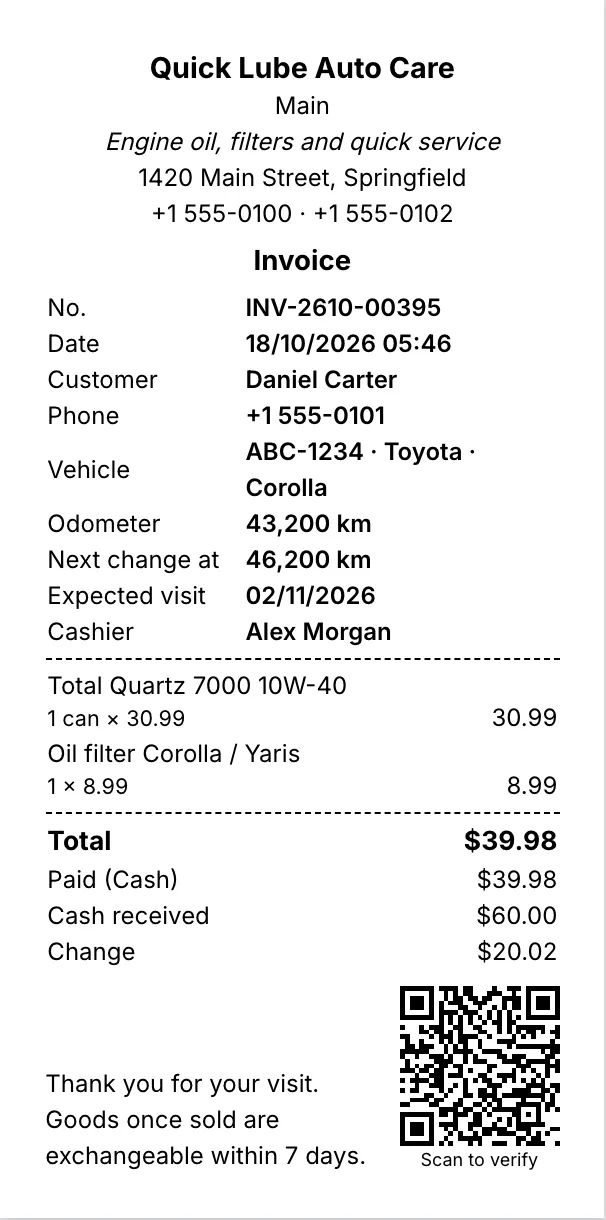
80 mm thermal receipt with items, total, change and a QR code
80 mm thermal receipt. Every printout shows the saved figures and a QR code that proves the shop issued it.
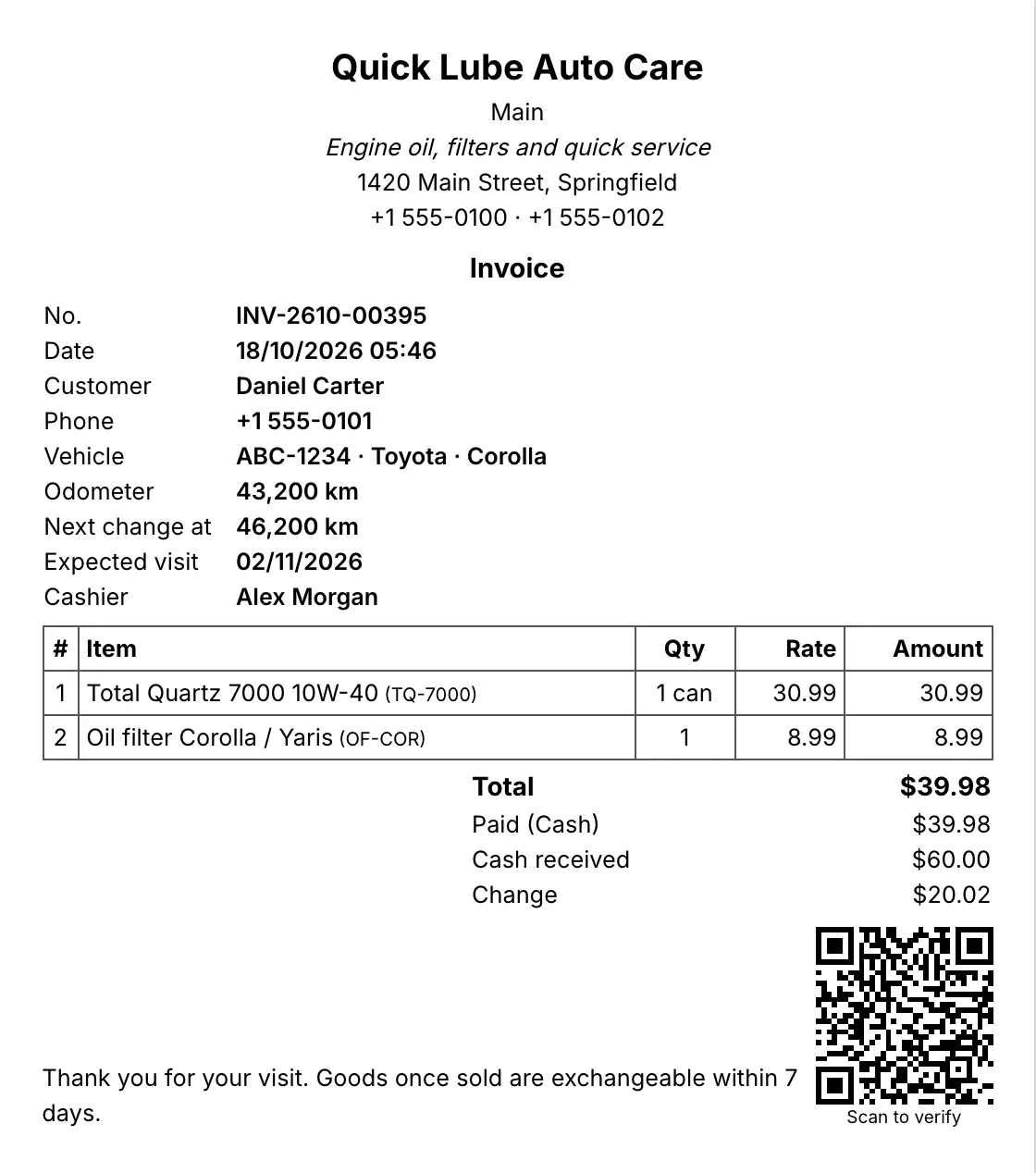
A5 invoice with the shop's details, customer, vehicle, items and totals
A5 invoice. A4, A5 or A6 invoices with your logo, tagline and footer.

What can RMS print?

Printout Used for
A4, A5 or A6 invoice Proper bills with your logo, tagline and footer
80 mm thermal receipt Fast receipts at a busy counter
Windscreen service sticker Next change km and expected date
50 × 30 mm barcode labels Price labels for shelves and stock received
Job card and estimate Workshop copy with rack locations, and the customer’s estimate
Credit note, payment receipt, cash report Returns, customer credit payments and day close

Choose the paper size at setup and change it any time in Settings. Print-on-save prints each bill as it is saved, and Ctrl+P reprints the last one.

How does the QR code stop fake receipts?

Every printout carries a QR code. When a customer brings back a receipt for a return or a warranty claim, read the code with any phone scanner and paste its text into Verify a receipt. RMS tells you whether your shop really issued it and whether it still matches your records. This works offline, so a changed amount or a receipt from another shop is caught at the counter.

Every printout shows exactly the saved figures. A corrected bill keeps its number, and the reprint shows the corrected amounts.

Does thermal receipt printing need special software?

No. RMS is the thermal receipt printing software: pick the 80 mm size and print to your receipt printer like any other printer. A4 or A5 printers work for invoices, and a label printer handles the 50 × 30 mm barcode labels, one label per page.

What goes on a tax invoice?

Enter your tax name (VAT, GST or sales tax), your rate and the shop’s tax registration numbers at setup. Tax can be included in prices or added on top. A tax invoice needs a customer with a tax registration number and gets its own number series, and amounts print in your own currency format. RMS prints tax invoices with your own tax name, rate and registration numbers, but it is not connected to any government e-invoicing or fiscal reporting system. Businesses that must report each sale to a tax authority in real time need a certified system.

Download the free 14-day trial and print your first receipt in a few minutes.

Which shops use it?

Questions shop owners ask

Which paper sizes can RMS print?

A4, A5 and A6 invoices, 80 mm thermal receipts, a windscreen service sticker and 50 × 30 mm barcode labels.

What is the QR code on the receipt for?

Scan it into the Verify a receipt box and RMS tells you whether your shop issued that receipt and whether it still matches your records. It works offline.

Can I print a VAT, GST or sales tax invoice?

Yes. Enter your tax name, rate and the shop's tax registration numbers at setup. A tax invoice needs a customer with a tax registration number and gets its own number series. RMS is not connected to any government e-invoicing or fiscal reporting system.

Do I need a thermal printer?

No. Any A4 or A5 printer works for invoices. An 80 mm thermal printer is optional for quick receipts.

More features

POS & billingInventory & purchasingCustomer creditReports & dashboardService remindersJob cardsWorks offlineBackups & security

Try RMS free for 14 days

Every Pro feature, no card needed. Keep it from USD 39 a year or pay once for life.

14-day trial · Windows, macOS, Linux · Works offline

Download free trial