
Skip to content
RMS

RMS for general store shops

Grocery store POS software for fast barcode billing and customer credit

RMS is offline grocery store POS software for corner shops, convenience stores and small markets. Scan barcodes, sell loose items by kg or lb from scale labels, buy in cartons and sell by the piece, keep store credit for regulars and sell the batch that expires first. It runs on your own computer without internet.

Last updated 18 October 2026

What problems does it solve?

A day at your counter with RMS

  1. 1

    Scan and go

    Scan each barcode, or type 3*code to add three at once. A 10-item barcode sale takes under 20 seconds.

  2. 2

    Loose items from the scale

    Scan the scale's label and the item is added at that weight, for example 1.25 kg of sugar.

  3. 3

    Quick-sale buttons

    Bread, eggs and fresh items without barcodes sit as buttons above the bill. One tap adds them.

  4. 4

    Take payment or put it on account

    Cash with change, card, mobile wallet or bank transfer, or on the customer's account with a promised date.

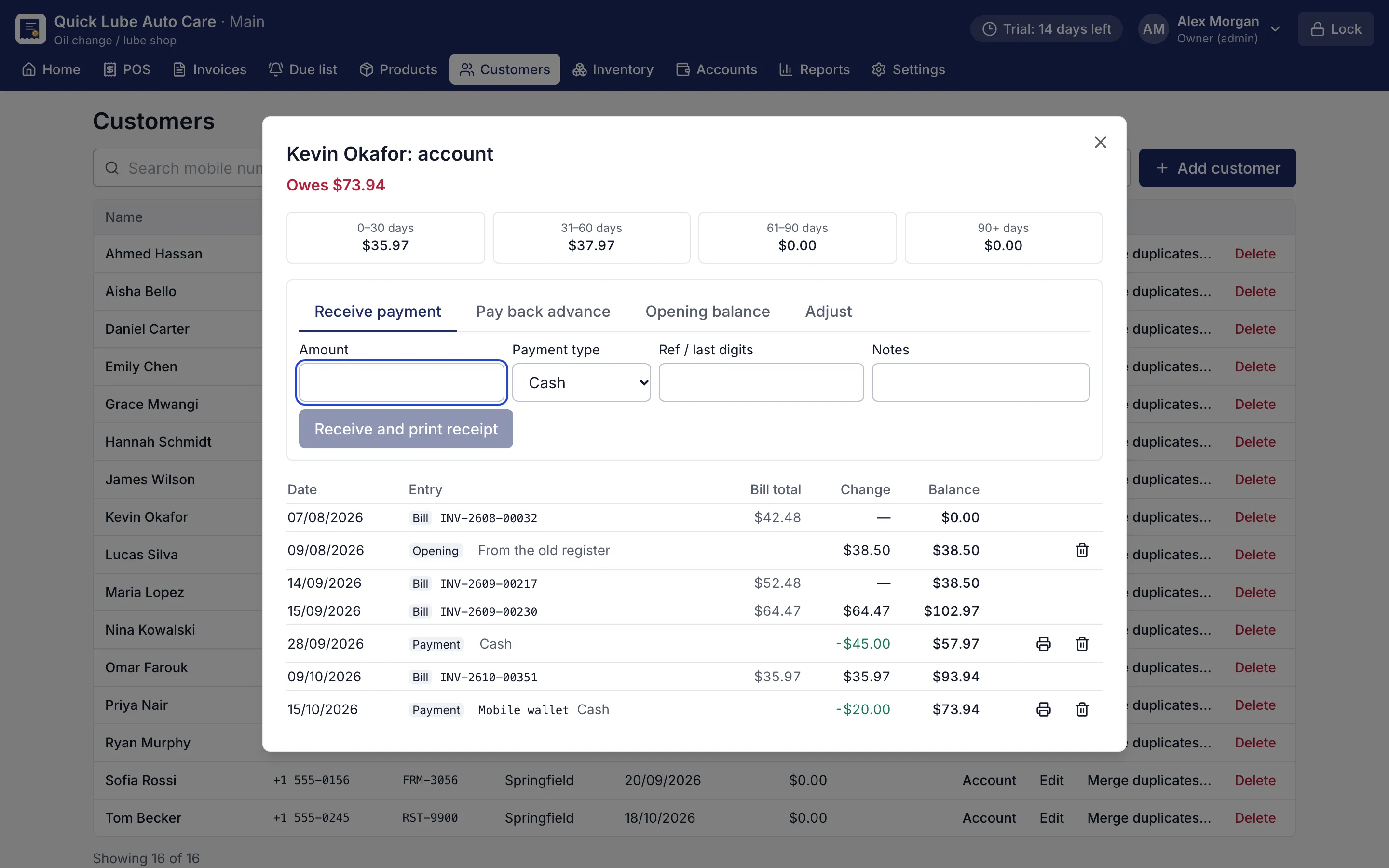
    Customer account statement with bills, payments and running balance
    Customer account statement. Every credit bill and payment with a running balance and ageing.
  5. 5

    Close the day

    Count your notes and coins. RMS shows short or over and keeps the count.

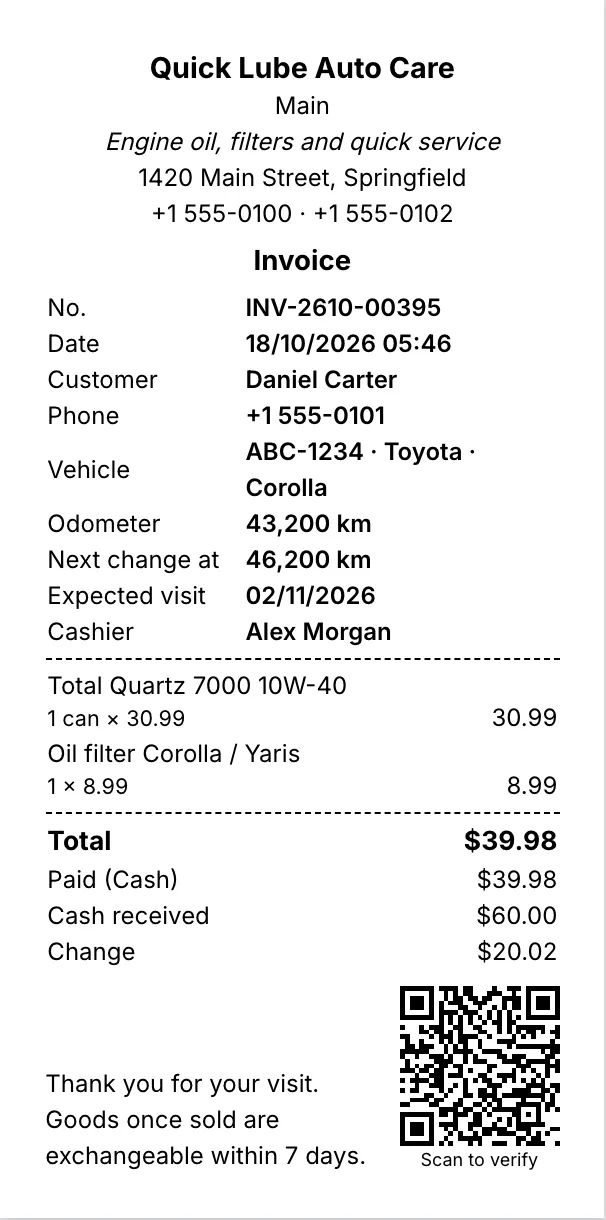
    80 mm thermal receipt with items, total, change and a QR code
    80 mm thermal receipt. Every printout shows the saved figures and a QR code that proves the shop issued it.

What should grocery store POS software do?

A grocery or corner store sells hundreds of small items to the same neighbourhood every day. Speed at the counter and trust in the customer accounts matter more than anything else. RMS is grocery store POS software built for that counter: scan, tap, take payment, and move to the next customer.

Items with barcodes are scanned. Loose items such as rice, lentils, sugar or deli goods come from the weighing scale with a printed label that RMS reads, by the kilogram or the pound. Items without any barcode, such as bread, eggs or produce from a local supplier, sit as quick-sale buttons above the bill. A 10-item barcode sale takes under 20 seconds, checked by automated tests.

How does RMS keep customer credit honest?

The notebook under the counter is where most money is lost. In RMS, every credit sale goes to the customer’s account with an optional promised date. When they pay, a receipt prints with the balance left. The customer statement shows every bill and payment, so a disagreement is settled by printing one page.

The Due list and receivables show who owes more than a set amount for too long, and whose promised date has come. Opening balances from the old notebook can be added on day one.

What about stock, expiry and cartons?

  • Buy in cartons and sell in pieces, packs or dozens, with conversions such as 1 carton = 24 bottles.
  • Sell loose goods in quantities like 1.25 kg or 3.5 L where the unit allows it.
  • Type the batch and expiry when goods arrive; the counter sells the oldest batch first.
  • The Expiry list shows what is expiring soon so you can put it on offer before it is wasted.
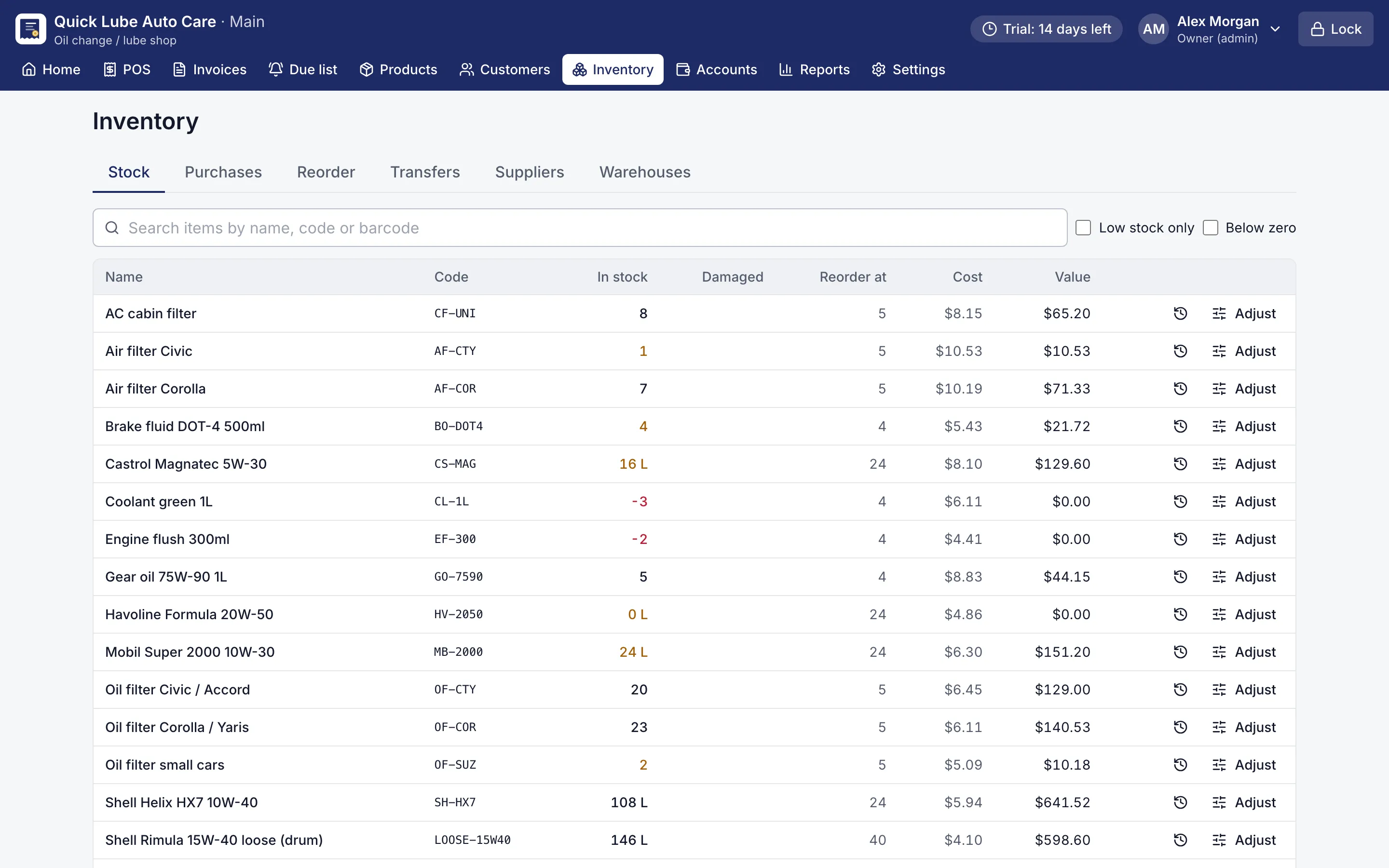
  • Low-stock items appear on the dashboard and on a reorder list by supplier.

Loyalty points can reward regular families: they earn points on what they pay and spend them on a later bill. Prices show in your own currency, with your symbol, decimals and number format.

Does it work during power cuts?

Yes. RMS runs on the shop’s own computer and does not need internet to sell, print or close the day. Put the PC on a UPS and the counter keeps going. Backups run every 2 hours and can be copied to a USB stick.

Try it at your counter

Choose “General store” in the setup wizard and the usual grocery categories are ready. Import your item list from a CSV file or add items as you scan them. Every Pro feature is free for 14 days, and no card is needed.
Screens for general store shops

80 mm thermal receipt with items, total, change and a QR code
80 mm thermal receipt. Every printout shows the saved figures and a QR code that proves the shop issued it.
Customer account statement with bills, payments and running balance
Customer account statement. Every credit bill and payment with a running balance and ageing.
Stock list with quantities, reorder points and low-stock items highlighted
Stock list. Stock in every warehouse, with low-stock and below-zero items flagged.

Questions shop owners ask

Does RMS work with a barcode scanner and a weighing scale?

Yes. Scan product barcodes at the counter. For the scale, set the prefix and digits your scale prints, and scanning its label adds the item at that weight or price, in kg or lb.

Can I keep store credit for my regular customers?

Yes. Put a bill or part of it on the customer's account with a promised date. The account statement shows every bill and payment with a running balance, and each payment prints a receipt.

Can I buy in cartons and sell in pieces?

Yes. Add units such as 1 carton = 24 bottles or 1 pack = 12 pieces to a product. Buy in cartons, sell by the piece or by the dozen, and stock stays correct.

How does RMS handle expiry dates?

Type the batch and expiry date when stock arrives. The counter sells the batch that expires first and skips expired ones, and the Expiry list shows what to clear soon.

Other shops RMS is made for

Departmental storeClothingMobile & electronicsHardwareOther retail

Try RMS in your general store shop

Every Pro feature, no card needed. Keep it from USD 39 a year or pay once for life.

14-day trial · Windows, macOS, Linux · Works offline

Download free trial