
Skip to content
RMS

Feature

Inventory and stock management software

RMS is offline inventory and stock management software for independent shops. Stock goes down with every bill and up with every stock in, low-stock items are flagged, and the reorder list fills a purchase order. It handles units like litres, kg and cartons, batches with expiry, serial numbers and IMEIs, and several warehouses.

Last updated 18 October 2026

What problem does it solve?

Most shops find out an item has run out when a customer asks for it. Paper stock registers never match the shelf, the supplier's balance lives in a separate notebook, and nobody knows what the stock is worth.

What do you get?

  • Stock goes down when a bill is saved and up when goods are received, in every warehouse.
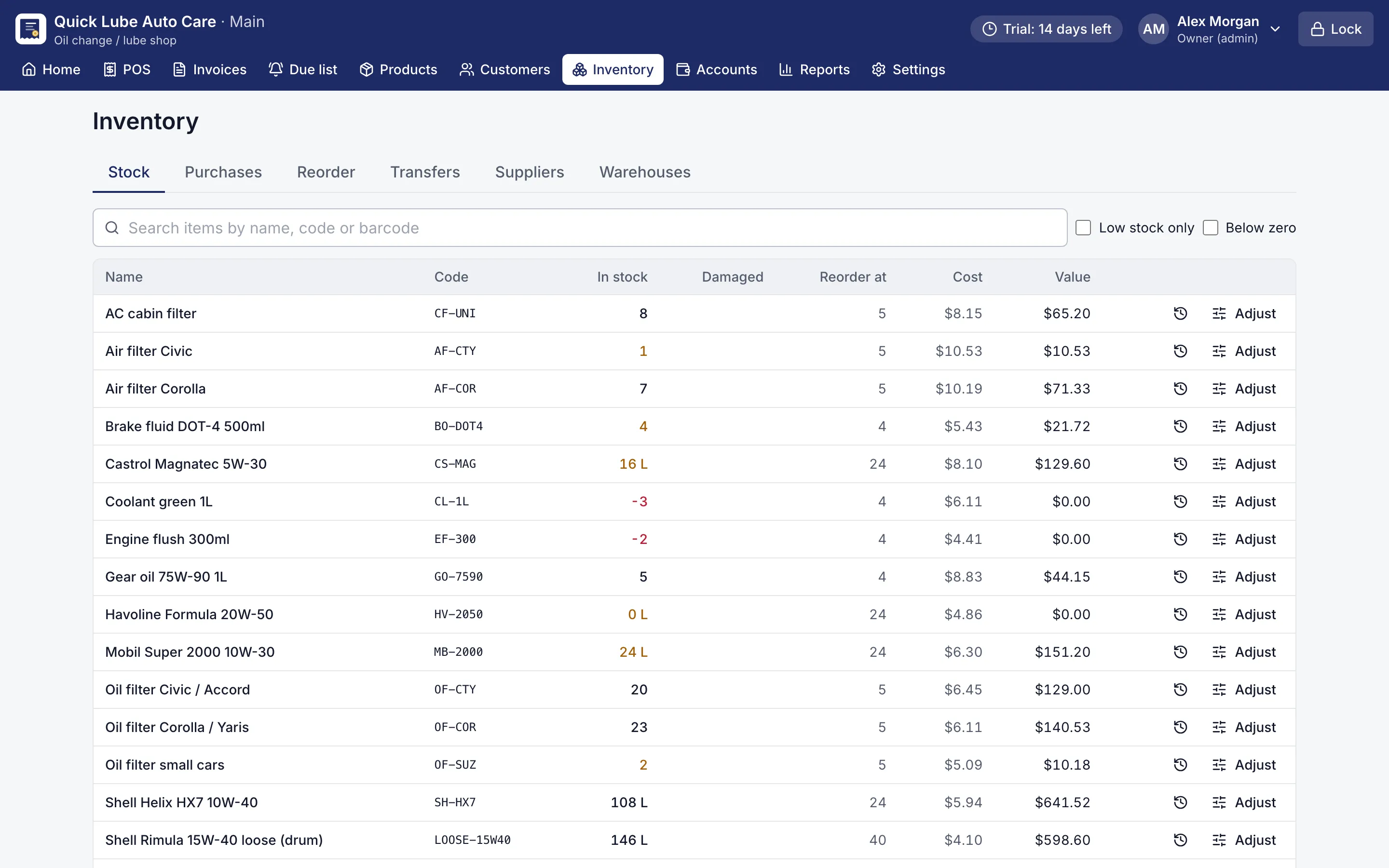
  • The stock list flags items at or below their reorder point and items below zero.
  • Each item's history shows every sale, purchase, return, adjustment and transfer with the stock left after it.
  • Stock in records the supplier's bill number and sets the cost to the weighted average of old and new stock.
  • Adjust stock by count, add, take out, damaged or write-off, always with a reason.
  • Stock, buy and sell in pieces, litres, millilitres, US or imperial gallons, kg, lb, metres, feet, dozens, packs or cartons, with conversions such as 1 carton = 24 bottles.
  • Buy a 208 L drum and sell loose litres; Open pack turns the drum into litres at its cost. Quantities like 3.5 L or 1.25 kg are allowed where the unit permits.
  • Batches with expiry sell first-expiry-first-out, and serial numbers or IMEIs are scanned in and out.
  • The reorder list groups items by usual supplier and can be exported as CSV or turned into a purchase order.
  • On Pro: purchase orders received in parts, buying on supplier credit with a ledger, several warehouses and transfers.
Stock list with quantities, reorder points and low-stock items highlighted
Stock list. Stock in every warehouse, with low-stock and below-zero items flagged.
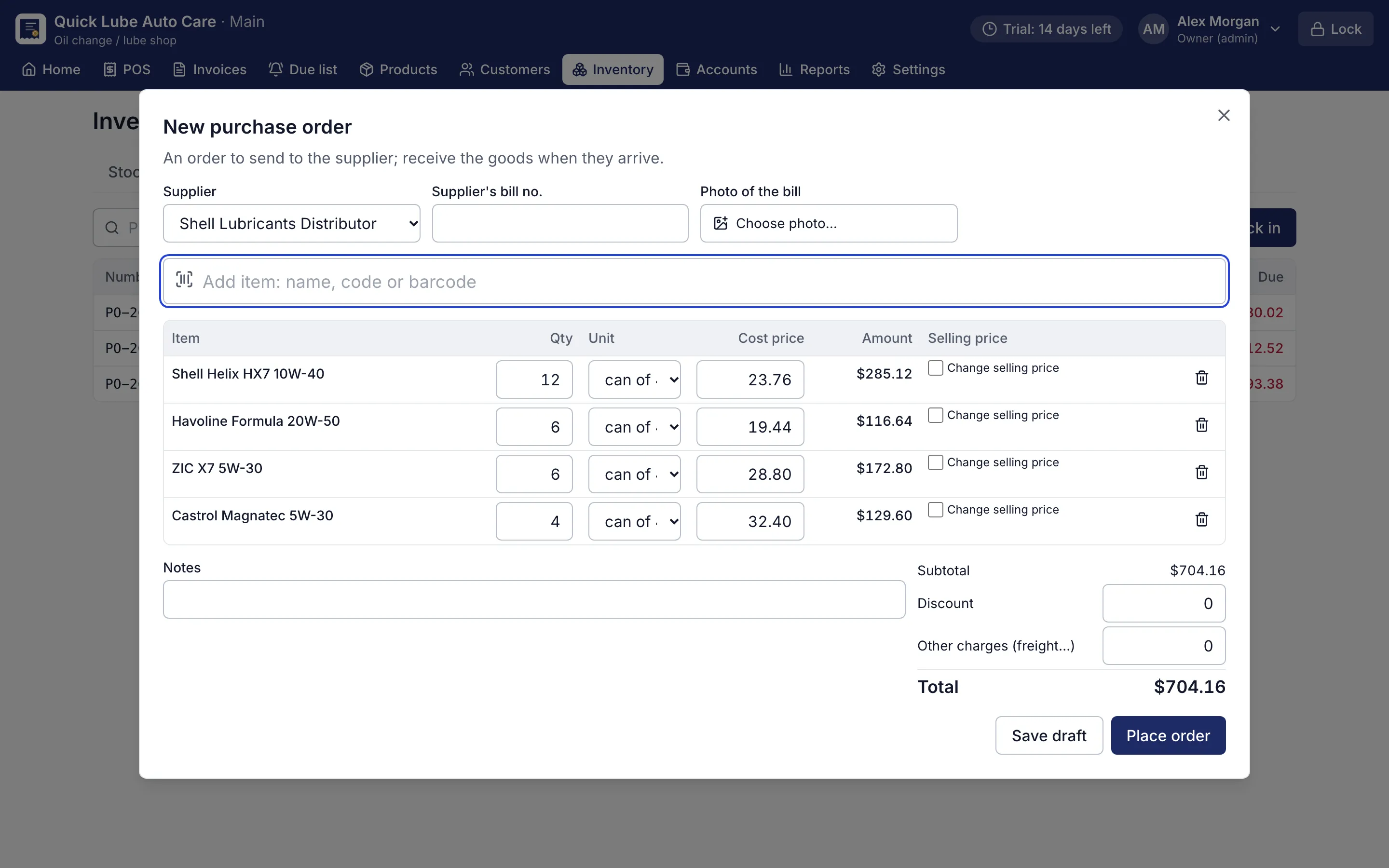
Purchase order form with supplier, items, quantities and costs
Purchase order. Orders received in parts, on credit, with the supplier's ledger.

Why does stock never match the register?

Because the register only changes when someone remembers to write in it. With RMS inventory and stock management software, stock changes by itself: every saved bill takes items out, every stock in puts them back, and every return or exchange does the right thing. Damaged goods move into a separate count, so they are not sold by mistake.

When the shelf and the screen disagree, type what is on the shelf as a Stock count. The difference is booked with a reason, and the item’s history keeps every movement newest first.

How do I receive goods from a supplier?

  1. Choose the supplier and type their bill number (a photo of the bill is optional).
  2. Scan or type the items; 10*code adds ten.
  3. Check cost prices and change selling prices if needed.
  4. Choose Receive into stock.

The cost becomes the weighted average of old and new stock, and every price change is kept in the price history. Barcode labels for everything received can be printed in one go.

Goods sent back to a supplier leave stock and print a debit note. On Pro, place a purchase order first and receive it all at once or in parts, buy on credit, and pay the supplier from their ledger.

Does it handle my kind of stock?

Your stock What RMS does
Engine oil in drums Loose units: open a 208 L drum into litres, sell 3.5 L at a time
Cartons of soap or biscuits Buy by carton (1 carton = 24 pieces), sell by piece
Rice, nails, paint Sell by kg or lb, by the piece or by the US or imperial gallon
Cable, chain, fabric Stock in metres or feet, sell any length
Medicines, food, lubricants Batches with expiry, first-expiry-first-out
Mobile phones IMEI scanned in and out, warranty lookup
Clothes and shoes Sizes and colours, each with its own barcode and stock
Spare parts Part and OEM numbers, rack locations, parts by make, model and year

What about more than one store room or warehouse?

Pro keeps stock in several warehouses and moves stock between them. A branch can be sent stock as a transfer file, carried on a USB stick; the branch receives it once, and a changed file is refused. There is no live sync between branches.

Stock value, purchases and supplier reports come straight from the same records. Download the free 14-day trial, no card needed, and count your shelves into RMS this week.

Which shops use it?

Questions shop owners ask

Can RMS warn me when stock is running low?

Yes. Set a reorder point on each item. The stock list flags low items, the dashboard lists them under Needs attention, and the reorder list groups them by supplier.

Can I buy in cartons and sell in pieces, or buy by the drum and sell by the litre?

Yes. Add purchase units such as 1 Carton = 24 Bottles in the product form. Loose items like engine oil can be bought in a 208 L drum and opened into litres, and goods can be kept in litres, gallons, kg, lb, metres or feet.

Does RMS track expiry dates and IMEI numbers?

Yes, when those features are switched on. Batches sell the earliest expiry first and skip expired stock; serial numbers and IMEIs are scanned when goods arrive and when they are sold.

Can I track what I owe a supplier in RMS?

On Pro, buying on credit adds to what you owe the supplier, and the supplier ledger shows purchases, payments and the running balance. In Basic, purchases are paid in full.

Can I import my product list from Excel?

Yes. Import a CSV file saved from Excel. RMS shows how many rows are new or updated and lists any problem by line before anything is imported.

More features

POS & billingCustomer creditReports & dashboardService remindersJob cardsPrinting & receiptsWorks offlineBackups & security

Try RMS free for 14 days

Every Pro feature, no card needed. Keep it from USD 39 a year or pay once for life.

14-day trial · Windows, macOS, Linux · Works offline

Download free trial