
Skip to content
RMS

Feature

Sales and profit reports with Excel export

RMS gives independent shops 32 sales, stock and money reports, each with a totals row, print, CSV and Excel export, plus an owner dashboard. Monthly profit and loss uses each item's cost on the day it was sold. Every total comes from one calculation, so screen, print and Excel agree. It all works offline.

Last updated 18 October 2026

What problem does it solve?

At the end of the month most owners still do not know their real profit. Sales are in one register, expenses in another and customer credit in a third, and adding them up by hand takes days and never quite matches the cash.

What do you get?

  • RMS has 32 reports, each with a totals row and Print, CSV and Excel buttons (Excel needs Pro).
  • Choose Today, Yesterday, This week, This month, Last month or your own dates; more than one day needs Pro.
  • Filter by customer, user, staff, category, brand or supplier where it applies.
  • Sales reports by bill, day, category, item, brand and customer, plus discounts, tax and returns.
  • Money reports for what customers owe, recovery, expenses, other revenue, cash by day and profit and loss by month (Pro).
  • Stock value, purchases, sales by supplier and supplier payments.
  • Industry reports such as tyres by size, parts by vehicle, labour by mechanic, wash packages and serial and warranty register.
  • The dashboard shows today's sales, bills, average bill, cash in the drawer, what customers owe and items that need attention.
  • Users who may not see purchase prices get reports without cost and profit.
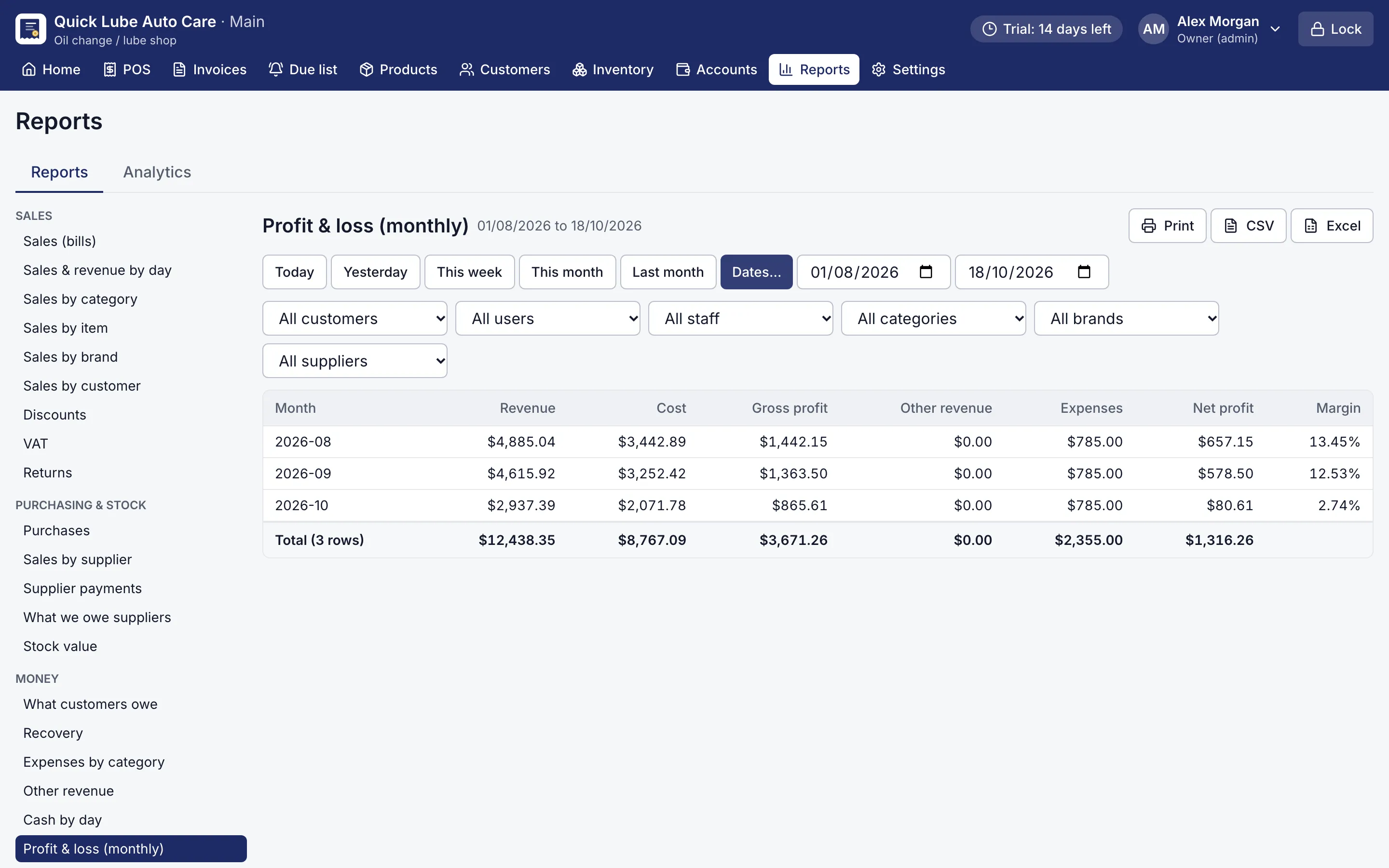
Monthly profit and loss report with revenue, cost, gross and net profit
Profit and loss report. 32 reports, each with print, CSV and Excel export.
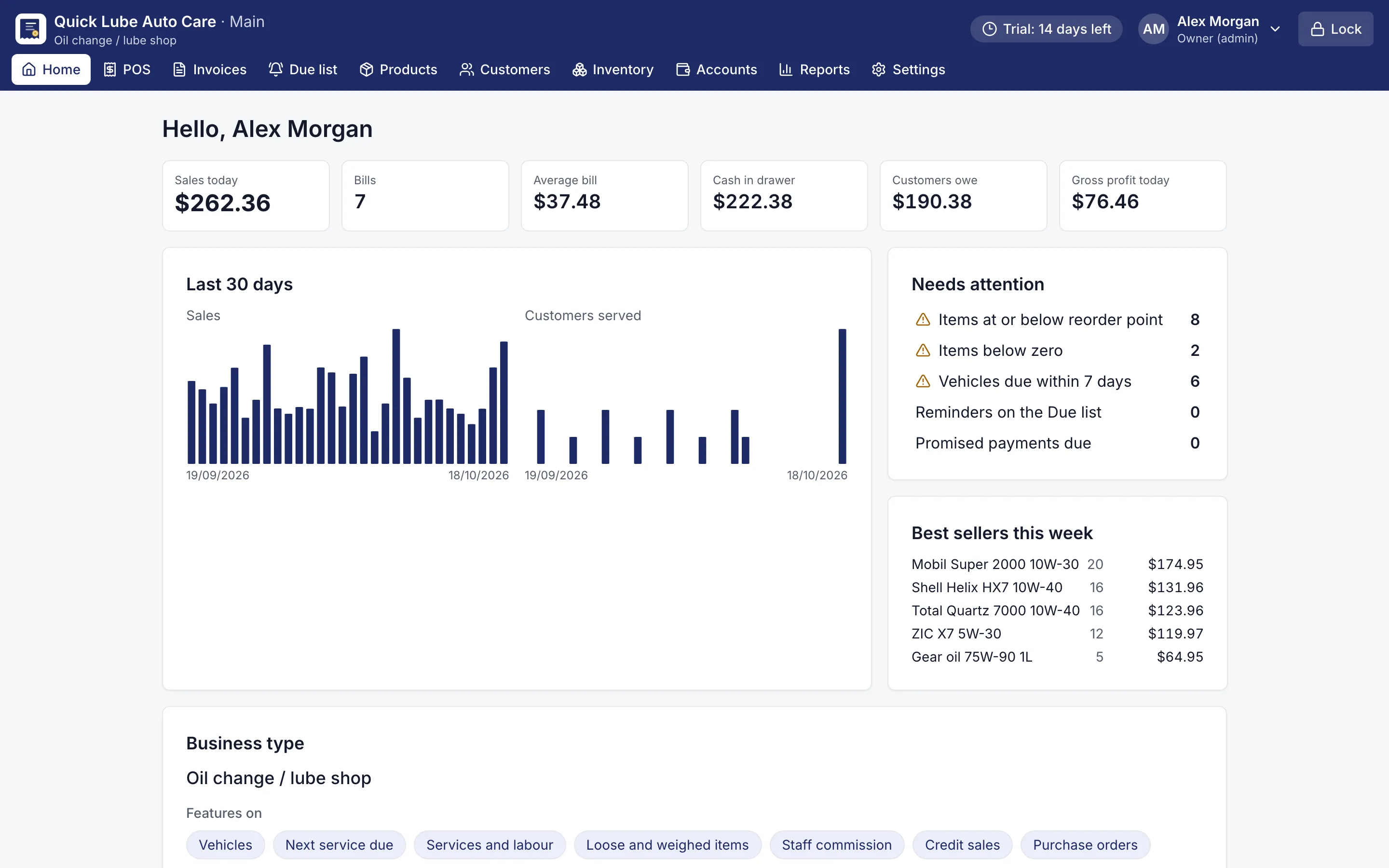
Dashboard with today's sales, cash in drawer, customers owing and items needing attention
Owner dashboard. Today's sales, cash, what customers owe and what needs attention.

What reports does RMS give a shop owner?

RMS has 32 reports in five groups. Choose a report on the left, pick the dates, and every figure has a totals row at the bottom.

Group Examples
Sales Bills, by day, by category, by item, by brand, by customer, discounts, tax (VAT, GST or sales tax), returns
Purchasing and stock Purchases, sales by supplier, supplier payments, what we owe suppliers, stock value
Money What customers owe, recovery, expenses and other revenue, cash by day, profit and loss by month
Staff Commission and sales targets
Your features Tyres by size, parts by vehicle, labour by mechanic, wash packages, memberships, coupons, loyalty points, exchanges, sales by size and colour, serial and warranty register

Which industry reports appear depends on the features your shop uses.

Can I open sales and profit reports in Excel?

Yes. Every report has Print, CSV and Excel buttons. CSV works on Basic; Excel export is part of Pro. Hand the file to your accountant, or keep it with your own monthly records.

Because every total comes from one calculation, the figure you see on screen is the same one in print, on the dashboard and in the Excel file. There is no “the report says one thing, the register says another”.

What does the dashboard show each morning?

The Home screen is the owner’s dashboard. It shows today’s sales, number of bills, average bill, cash in the drawer and what customers owe. Gross profit shows only to users allowed to see costs. Needs attention links to low-stock items, vehicles due within seven days, jobs in the workshop, promised payments that are due and batches expiring soon. Pro adds 30-day graphs and month-by-month analytics: new and returning customers, top customers and brands by margin.

Is it fast with years of bills?

Yes. With five years of data (200,000 bills), everyday screens answer in milliseconds and a 12-month profit and loss report in well under a second. Everything runs on your own computer, so reports open the same during an internet outage.

Download the free 14-day trial, which includes every Pro report, and see last month’s profit for yourself.

Which shops use it?

Questions shop owners ask

How many reports does RMS have?

RMS has 32 reports with totals, print, CSV and Excel export, plus an owner dashboard. Excel export, multi-day and financial reports need Pro.

How does RMS work out profit?

The profit and loss report uses each item's cost on the day it was sold, by month. It is a Pro report and is included in the free trial.

Can my cashier see my profit?

Only if you allow it. Users without permission to see purchase prices get reports without cost and profit, and downloads need their own permission.

Will the report total match the printout and Excel?

Yes. Every total comes from one calculation, so it is the same on screen, on the dashboard, in print and in Excel.

Are reports slow with years of data?

No. With five years of data (200,000 bills), a 12-month profit and loss report runs in well under a second.

More features

POS & billingInventory & purchasingCustomer creditService remindersJob cardsPrinting & receiptsWorks offlineBackups & security

Try RMS free for 14 days

Every Pro feature, no card needed. Keep it from USD 39 a year or pay once for life.

14-day trial · Windows, macOS, Linux · Works offline

Download free trial