
Skip to content
RMS

Feature

Customer credit and store account software

RMS keeps customer credit and store accounts inside an offline POS. Every bill on account and every payment goes into the customer's statement with a running balance, payments print a receipt, promised dates come up when due, and ageing shows the oldest dues first. No internet, web login or phone app is needed.

Last updated 18 October 2026

What problem does it solve?

Credit written in a notebook gets lost across pages, and regular customers dispute what they owe. The shop gives credit every day but only notices how much is stuck when cash runs short at the end of the month.

What do you get?

  • Put all or part of any bill on the customer's account, with an optional promised payment date.
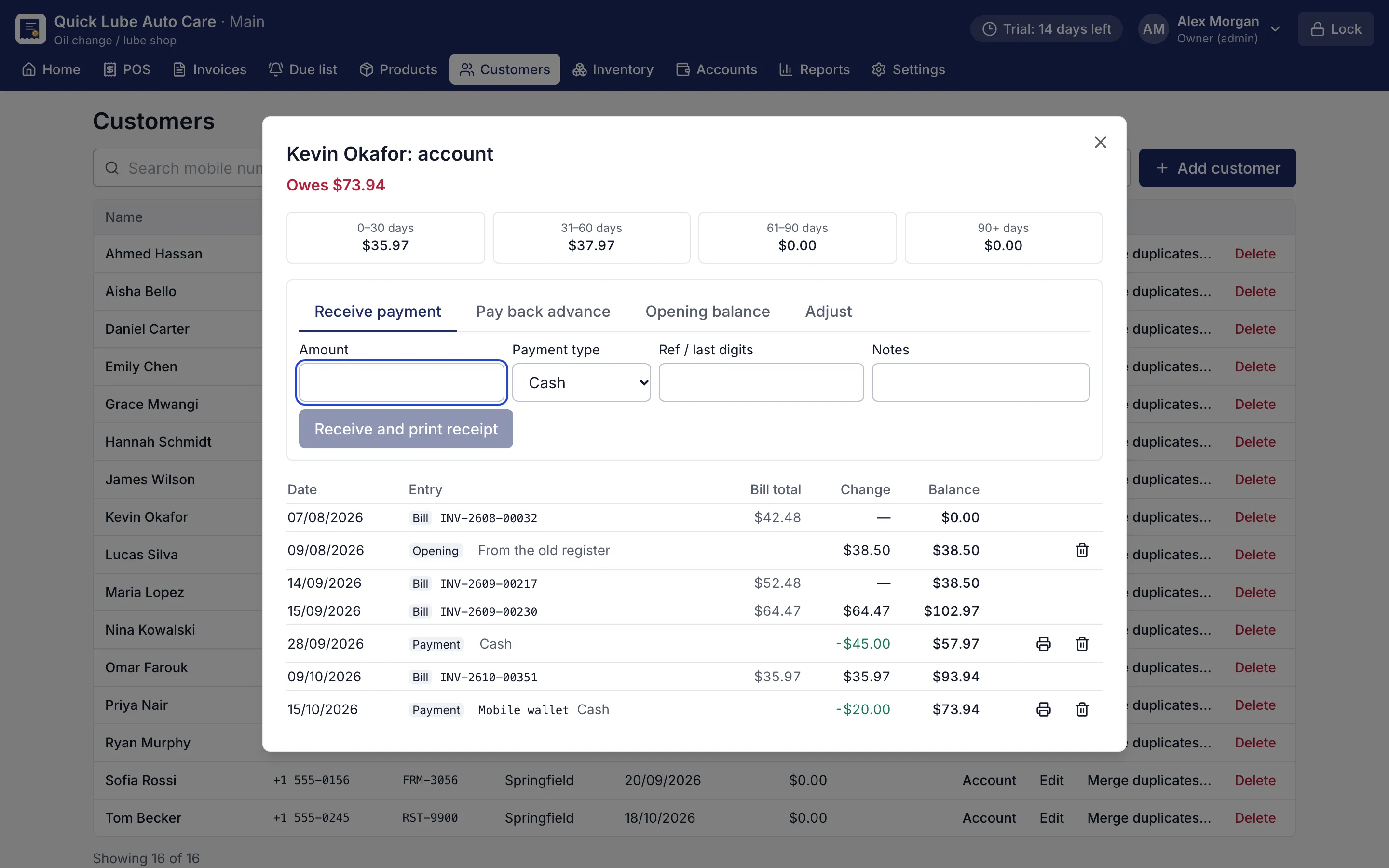
  • The customer statement lists every bill, payment, return and correction with a running balance.
  • Receive a payment at the counter and print a receipt that shows the balance now.
  • Collect an earlier balance together with a new bill.
  • Owners and managers can add an opening balance from the old notebook, adjust a balance with a reason or pay back an advance.
  • Receivables lists everyone who owes, largest first; on Pro it shows ageing in 0–30, 31–60, 61–90 and 90+ days.
  • Promised payments shows the bills whose promised date has come.
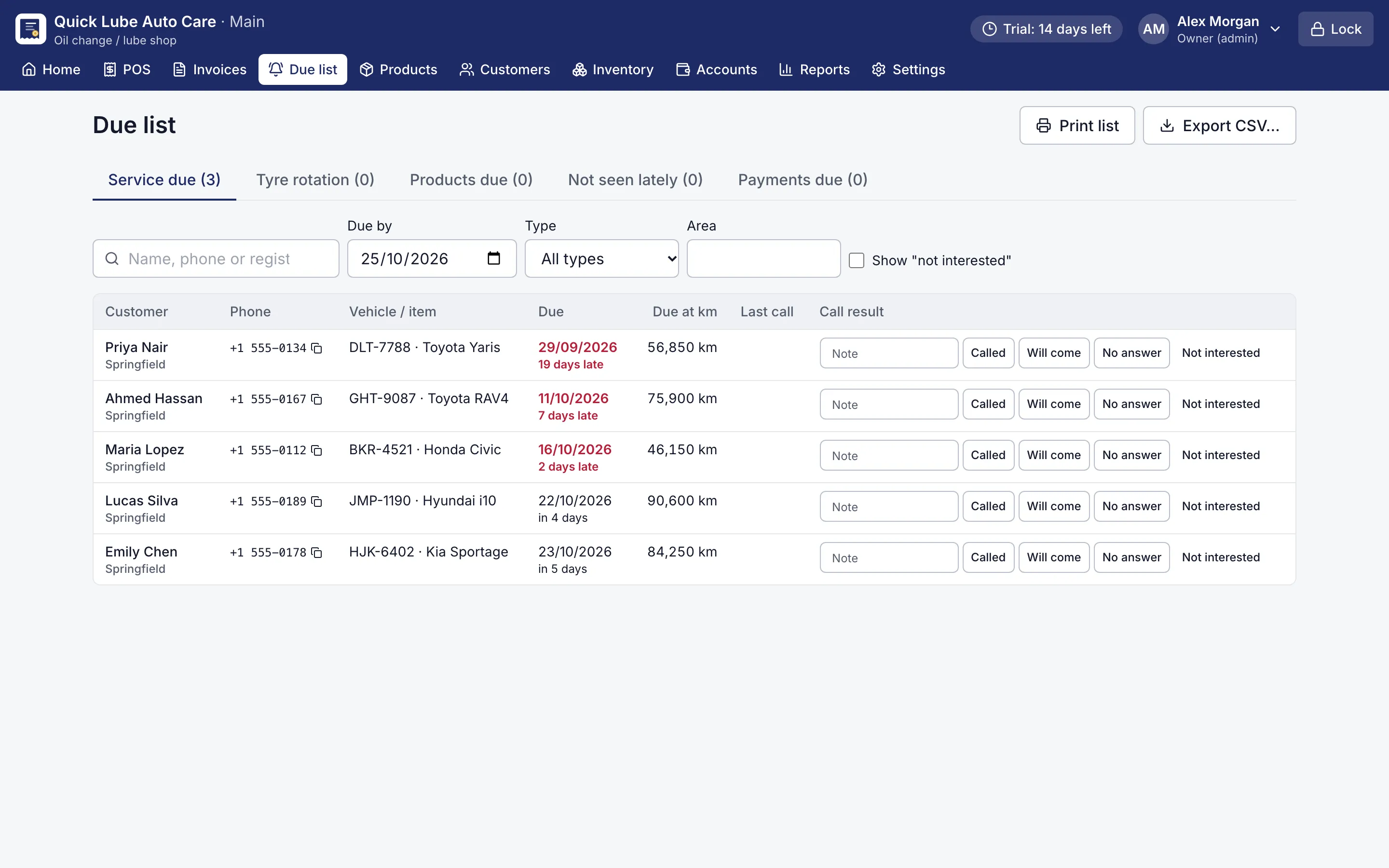
  • The Due list has a Payments due tab for customers owing more than a set amount for longer than a set number of days.
  • A default credit limit can be set for customers.
Customer account statement with bills, payments and running balance
Customer account statement. Every credit bill and payment with a running balance and ageing.
Due list of customers to call for service, with phone numbers and due dates
Due list. Who to call today: services, tyre rotation, products running out and payments due.

How does customer credit work inside the POS?

In most small shops, credit and billing live in two places: the bill book and the credit notebook. RMS joins them. When you save a bill and choose On account, the unpaid part goes straight onto that customer’s balance. Add a promised date if they say they will pay on Friday. Nothing is written twice, so the statement always matches the bills.

When the customer comes back, their balance shows at the counter. You can collect it with today’s bill, or use Receive payment on its own. A receipt prints with the balance now, which ends most arguments before they start.

What does a customer statement show?

  • every bill on account, with its date and number;
  • every payment received, and how it was paid;
  • returns and corrected bills;
  • the running balance after each entry.

Returns and corrected bills fix the balance by themselves. If a regular owed money in your old notebook or spreadsheet, add it once as an opening balance and carry on.

How do I know whom to chase first?

Receivables is your accounts receivable list: everyone who owes the shop, largest first. On Pro it splits each balance by age, 0–30, 31–60, 61–90 and over 90 days, so you chase the oldest first and payments clear the oldest dues first. Promised payments shows whose date has come today.

The Due list adds a Payments due tab: customers owing more than an amount you choose for longer than the days you set. Click a number to copy it, call, and record what happened (Called, Will come, No answer). RMS does not send SMS or WhatsApp messages itself; you stay in control of how you ask.

Where does the money go when they pay?

Every payment received lands in the day’s cash book, or under card, mobile wallet, bank transfer or any other payment type you add in Settings. At day close you count your notes and coins, and RMS shows if the drawer is short or over. The dashboard shows what customers owe in total at a glance. Amounts show in your own currency, with your symbol, decimals and number grouping.

All of this stays on your own computer and keeps working through power cuts and internet outages. Download the free 14-day trial, no card needed, and move your customer credit off paper this week.

Which shops use it?

Questions shop owners ask

How is RMS different from a separate credit or ledger app?

A ledger app only records what is owed. In RMS the credit comes from the bill itself, so the items, stock, cash book and customer balance always agree.

Can I enter the balances from my old notebook?

Yes. The owner or a manager adds an opening balance for each customer, and the statement starts from that amount.

Does RMS send payment reminders by SMS or WhatsApp?

No. RMS gives you a list of who owes and since when, with phone numbers to copy and a place to record the call result. You call or message the customer yourself.

Can I see how old each customer's dues are?

On Pro, Receivables shows ageing in 0–30, 31–60, 61–90 and 90+ days, and payments settle the oldest dues first. Basic shows who owes and how much.

Does a customer get a receipt when they pay?

Yes. Receive payment records it and prints a receipt with the balance after the payment.

More features

POS & billingInventory & purchasingReports & dashboardService remindersJob cardsPrinting & receiptsWorks offlineBackups & security

Try RMS free for 14 days

Every Pro feature, no card needed. Keep it from USD 39 a year or pay once for life.

14-day trial · Windows, macOS, Linux · Works offline

Download free trial