
Skip to content
RMS

RMS for other retail shops

Retail POS software for any kind of shop

RMS is offline retail POS software for shops of every kind, from stationery and cosmetics to homeware and gift shops. Bill with a barcode or quick-sale buttons, keep stock and customer credit, close the day by counting the drawer and read 32 reports. It runs on your own computer without internet.

Last updated 18 October 2026

What problems does it solve?

A day at your counter with RMS

  1. 1

    Set up in minutes

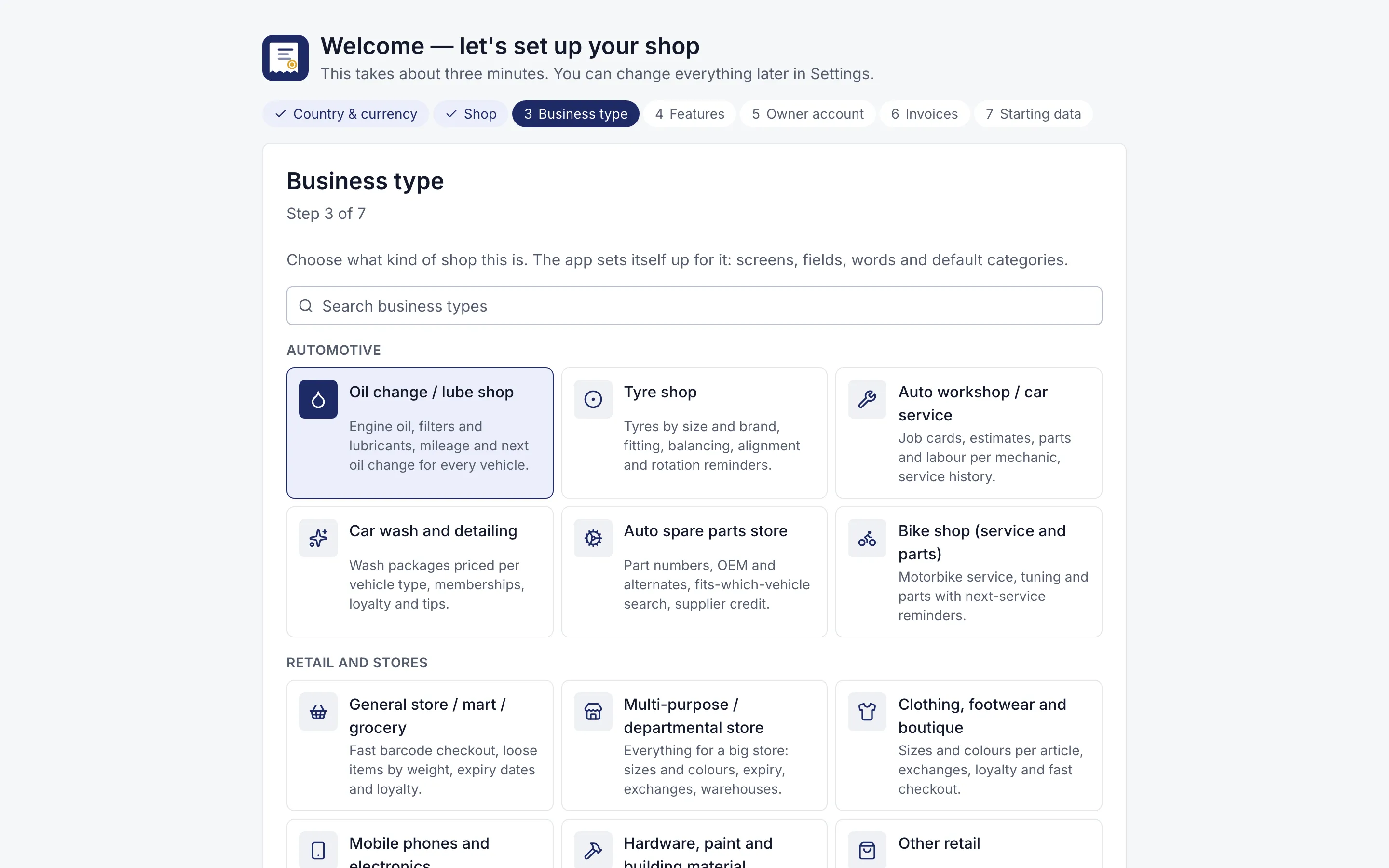
    Choose your kind of shop and your country in the setup wizard. RMS switches on the right features, currency and starting categories.

    Setup wizard asking the business type, with 12 kinds of shop to choose
    Three-minute setup. Choose your kind of shop; RMS switches on the right features and words.
  2. 2

    Sell

    Scan a barcode, type a name or tap a quick-sale button. Take cash, card, mobile wallet, bank transfer or credit.

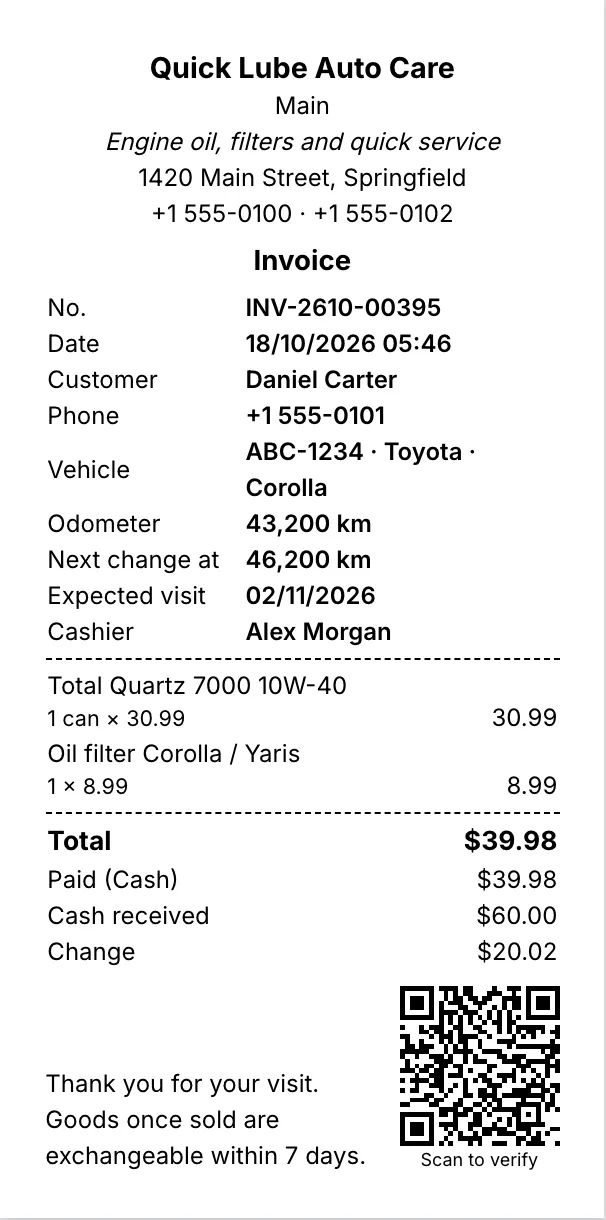
    80 mm thermal receipt with items, total, change and a QR code
    80 mm thermal receipt. Every printout shows the saved figures and a QR code that proves the shop issued it.
  3. 3

    Record expenses

    Enter rent, bills and salaries. Repeating expenses, like monthly rent, add themselves.

  4. 4

    Close the day

    Count your notes and coins; RMS shows short or over against the expected cash.

  5. 5

    Read the numbers

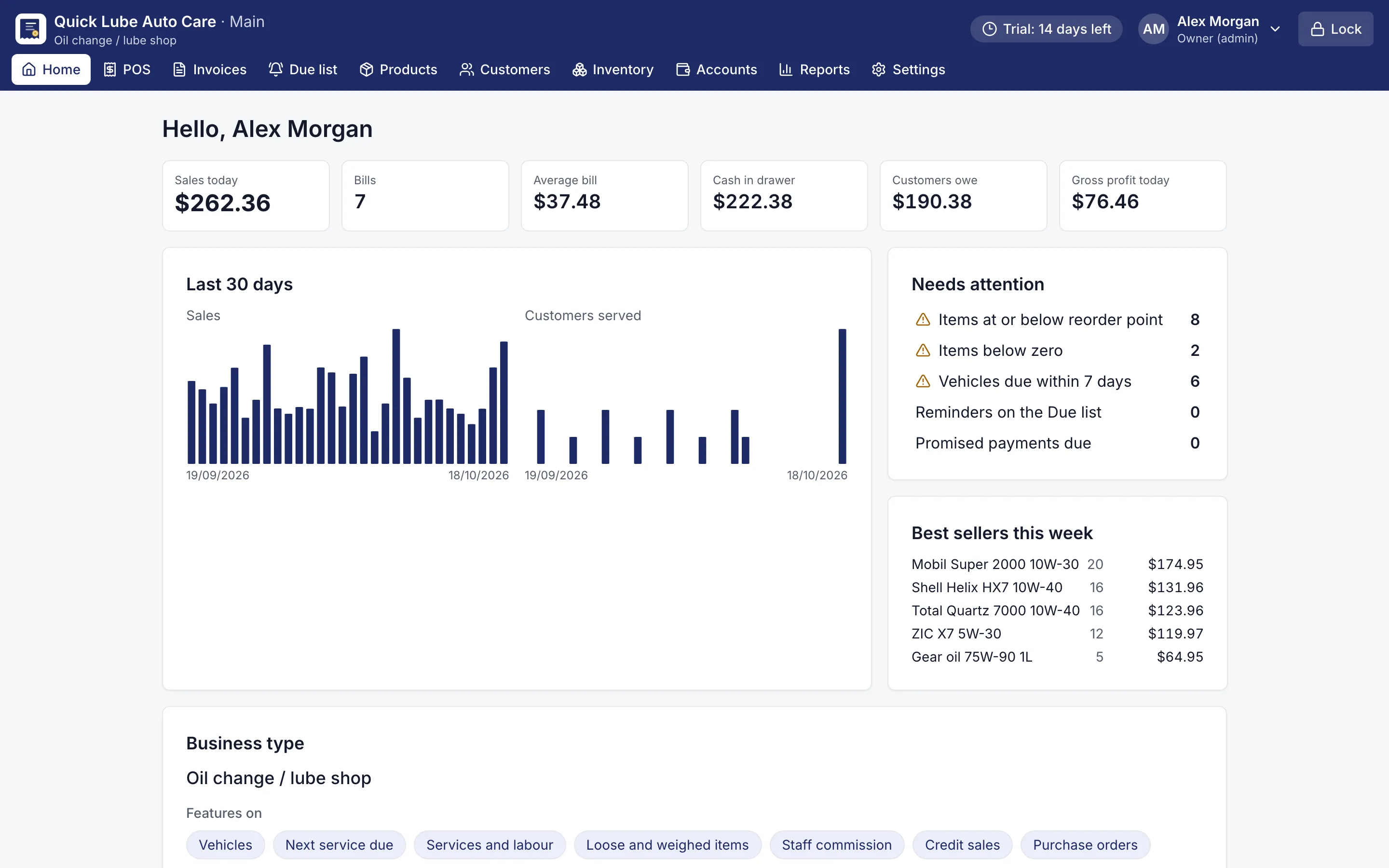
    The dashboard shows today's sales, cash and what customers owe; reports cover any period.

    Dashboard with today's sales, cash in drawer, customers owing and items needing attention
    Owner dashboard. Today's sales, cash, what customers owe and what needs attention.

What does retail POS software need to do?

Every shop, whether it sells stationery, cosmetics, homeware, toys or gifts, needs the same basics: a quick counter, honest stock, clear customer accounts and a true picture of the money. RMS is retail POS software that covers all four on one computer, without a monthly internet bill or a server.

Choose Other retail in the setup wizard and RMS starts simple: barcode billing, quick-sale buttons, stock and customer accounts. As the shop grows, switch on what you need in Settings, and switch it off again without losing data:

  • sizes and colours, each with its own barcode and stock;
  • batches and expiry dates;
  • serial numbers and warranty;
  • loose units such as kg, lb, litres, metres or feet, cartons to pieces, loyalty points and exchanges.

How does RMS keep the money straight?

Every sale, payment, refund, expense and tip goes through the cash book, so RMS knows what should be in the drawer. At closing, count your notes and coins and RMS shows exactly how much is short or over. Card, mobile wallet and bank transfer payments are listed separately, so they are never confused with cash, and one bill can be split across several payment types.

Customers who buy on credit get an account with a running balance and promised dates. Expenses such as rent and electricity can repeat by themselves every month.

What will the reports tell me?

RMS has 32 reports with totals, print, CSV and Excel export: sales by day, item, category and customer, purchases, expenses, what customers owe, stock value and profit and loss by month. Every total comes from one calculation, so it is the same on screen, in print and in Excel. Multi-day reports and Excel need Pro.

Is my data safe on one computer?

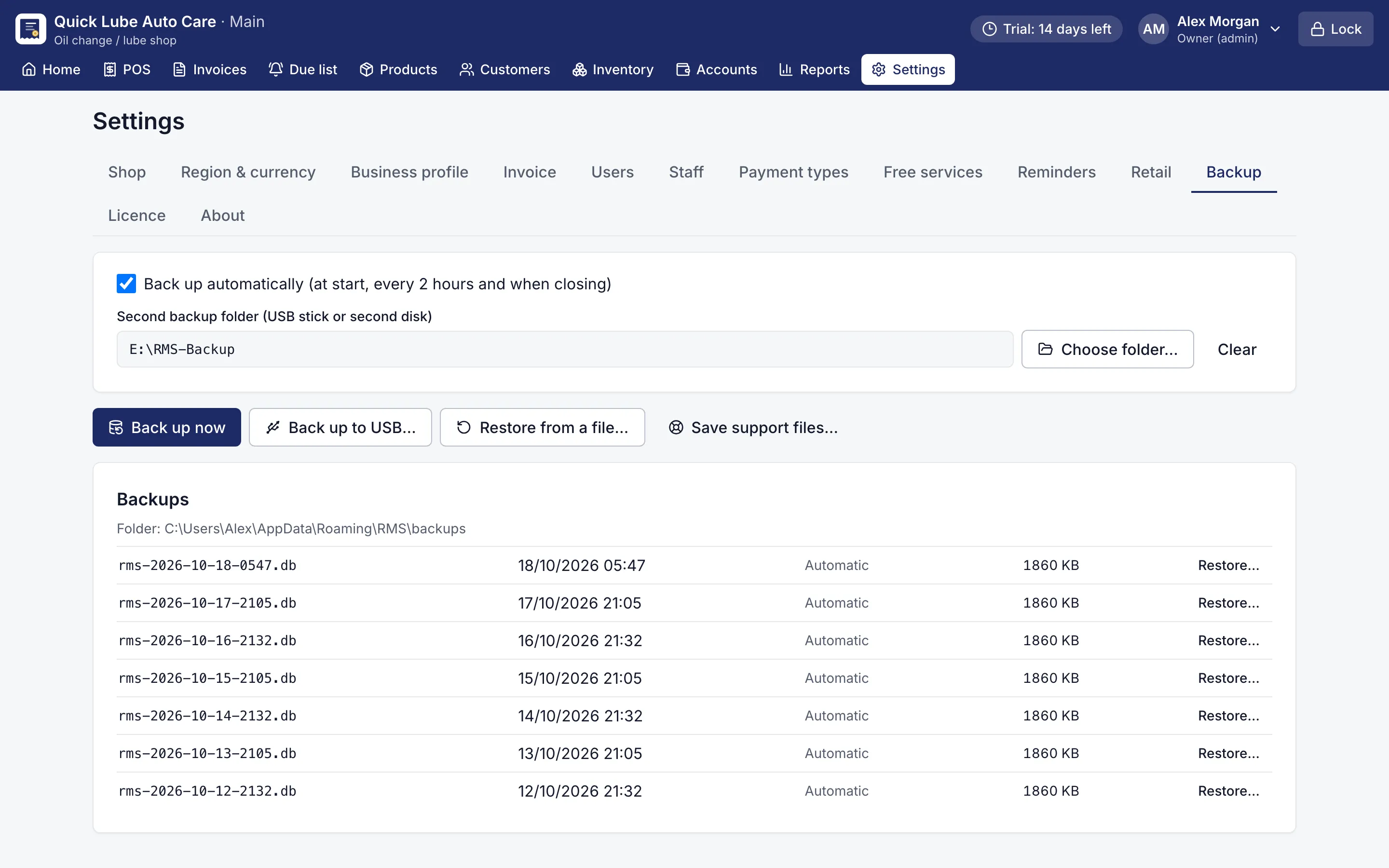
Yes. Backups run automatically and can be copied to a USB stick. Each user signs in with a PIN and has their own permissions, and an audit trail detects changes made outside the app.

Try it free

Install RMS, choose your kind of shop and start billing in a few minutes. The free 14-day trial includes every Pro feature and needs no card.
Screens for other retail shops

Setup wizard asking the business type, with 12 kinds of shop to choose
Three-minute setup. Choose your kind of shop; RMS switches on the right features and words.
Dashboard with today's sales, cash in drawer, customers owing and items needing attention
Owner dashboard. Today's sales, cash, what customers owe and what needs attention.
80 mm thermal receipt with items, total, change and a QR code
80 mm thermal receipt. Every printout shows the saved figures and a QR code that proves the shop issued it.
Backup settings with automatic backups, a USB folder and restore
Backups. Automatic backups, a second copy on USB, one-click restore.

Questions shop owners ask

My shop is not on the list. Can I still use RMS?

Yes. Choose Other retail in the setup wizard. You start with billing, stock, quick-sale buttons and customer accounts, and can switch on features such as sizes and colours, expiry dates or serial numbers later without losing data.

Can I see my monthly profit?

Yes, with Pro. The profit and loss report shows revenue, cost, expenses and profit month by month, using each item's cost on the day it was sold.

What happens if my computer breaks?

RMS backs up automatically when it starts, every 2 hours and when it closes, and can keep a second copy on a USB stick. Restore it on a new computer from the Backup screen after checking a preview.

What happens when the trial ends?

RMS becomes read-only. You can still view, print, export and back up every record; your data is never locked away. A licence makes it fully working again.

Does it work in my country and currency?

Yes. Choose your currency symbol and its position, 0 or 2 decimals, number grouping, date format and time zone, or pick a country preset at setup. Tax invoices use your own tax name, such as VAT, GST or sales tax.

Can I use it where the internet is poor?

Yes. RMS does not need internet for selling, printing, reports, backups or licence activation, so it works the same anywhere.

Other shops RMS is made for

General storeDepartmental storeClothingMobile & electronicsHardware

Try RMS in your other retail shop

Every Pro feature, no card needed. Keep it from USD 39 a year or pay once for life.

14-day trial · Windows, macOS, Linux · Works offline

Download free trial